

Evidence explorer
Every number in Nishio comes from an evidence record. The Evidence explorer shows where each observation came from, when, and how it was collected.
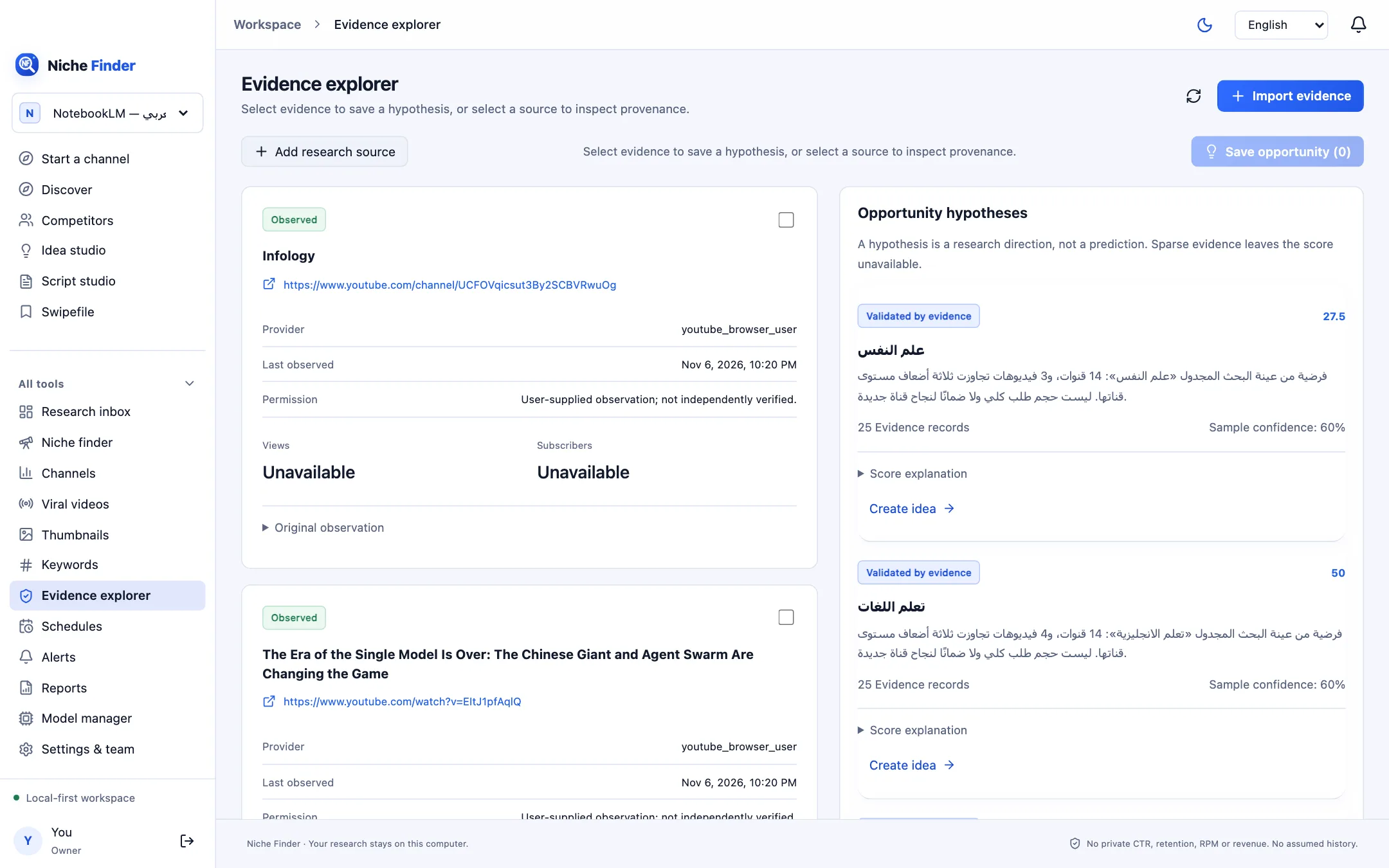
Inspect a source
Select a record to see its Source, Provider, Permission, Collection method, the Original observation and the Normalized metrics, plus “Open source” to return to the original page. User-supplied observations are labelled “not independently verified”.
Add your own research
- Click “Add research source”.
- Fill in Title, Source URL and Provider, and choose an Evidence type: Research note, Published trend report, Public sponsor disclosure, Authorized transcript, Authorized comment excerpt or Authorized visual observation.
- Write a “Source summary (your own words)”, set the language and observation time, confirm your permission, and save.
Save an opportunity hypothesis
- Select one or more evidence records.
- Click “Save opportunity”. The hypothesis then appears in Idea studio, where you can turn it into ideas.
A hypothesis is a research direction, not a prediction. Sparse evidence leaves the score unavailable.
Ask your evidence
Type a Research question and click “Find saved evidence” to locate matching records. Tick “Semantic evidence search” after “Index saved evidence locally” to search by meaning, and “Use selected local model” to have a local model help — both are optional and run on your computer.