

Extension tools on YouTube
Badges on videos, a research side panel, local saving, feed filters, thumbnail and title checks, a comments filter and a ten-idea planner — all working on the page you have open.
Badges and the side panel
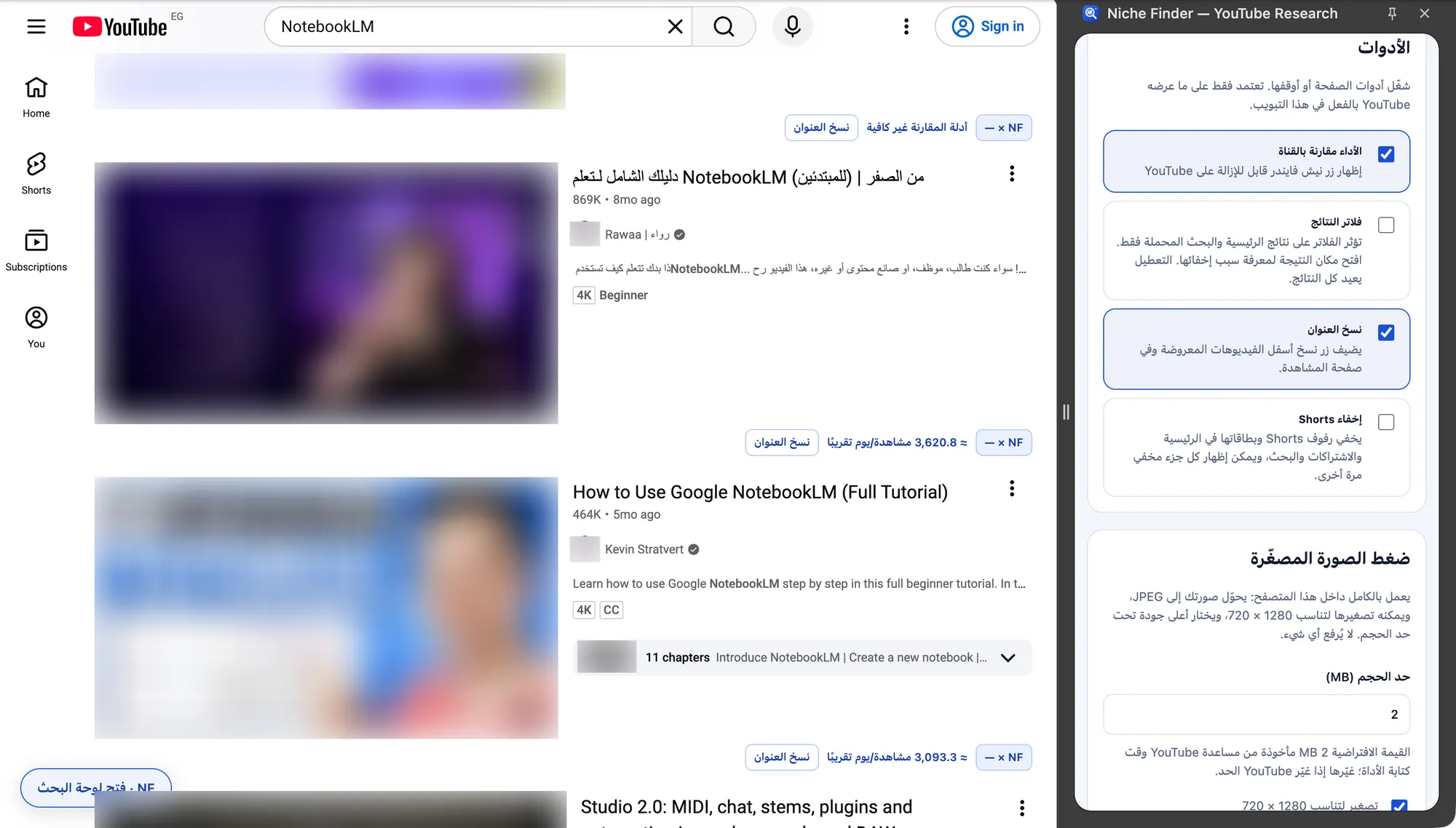
On YouTube pages each loaded video gets a small row: an ×NF ratio, an approximate views/day proxy and a Copy title button. The ratio is views ÷ the median of at least 8 other videos from the same channel and format; when there are not enough, it shows — and “Not enough comparable evidence”. Click a badge to open that video in the side panel. The side panel tabs are Current page, First 10 videos, Saved locally, Feed filters, Title & thumbnail, Tools and Preferences & sync.
Rounded views and relative dates (“2 weeks ago”) are approximate, and the views/day value is a lifetime average, not real-time speed. The optional Editable scenario only multiplies your own daily assumption; it does not predict performance.
Read and save a page
- Open a YouTube home, search, watch, Shorts or channel page.
- In Current page, click “Read visible page”. It reads up to 50 videos already rendered, only when you click — no auto-scroll and no background collection.
- Review the selected video, its source and observation time, confirm you may use the data, and click “Save page locally”. Add Tags, folder and notes (optional).
- Use “Track locally” to follow a channel in this browser. Saved locally lists your pages and “Compare saved channels”; “Export local research” downloads them.

Tools, filters and previews
- Tools tab: switch on-page helpers on or off — Channel-relative performance badges, Feed filters, Copy title and Hide Shorts. Each hidden Shorts block can be shown again.
- Feed filters: hide keywords, require keywords, minimum visible views, maximum age, maximum duration, hide watched videos, or only subscribed channels where that is visible. Hidden cards become “Hidden by your filters” placeholders with “Show this result”; cards with unknown values stay visible.
- Thumbnail compressor: converts your own image to JPEG, can resize it to fit 1280 × 720 and picks the highest quality under the size limit (2 MB by default). It runs entirely in the browser; nothing is uploaded.
- Title & thumbnail: place your original image (up to 1 MB) and title in a local mock-up, with checks for a ratio near 16:9, at least 1280 × 720, a title within 70 characters and average text contrast.
- Comments filter: on a video page, “Read loaded comments” reads only comments already loaded, then filters by words or minimum visible likes. Author names are not read and nothing is saved.

Ten ideas and today’s opportunities
In First 10 videos, type your channel topic and click “Build my first 10 briefs” to get ten creative production tasks in your output language, with no login and no AI. Save them with “Save ten ideas locally” or export them. These browser plans are stored separately from the plans in the app. When the extension is paired, the side panel also shows Today’s opportunities and your plans from the app.
