

DocsCreate
Idea studio
Turn opportunity hypotheses into video ideas or channel concepts, pick a title from several options, and track each idea from discovery to publication.
Real screenshot of the app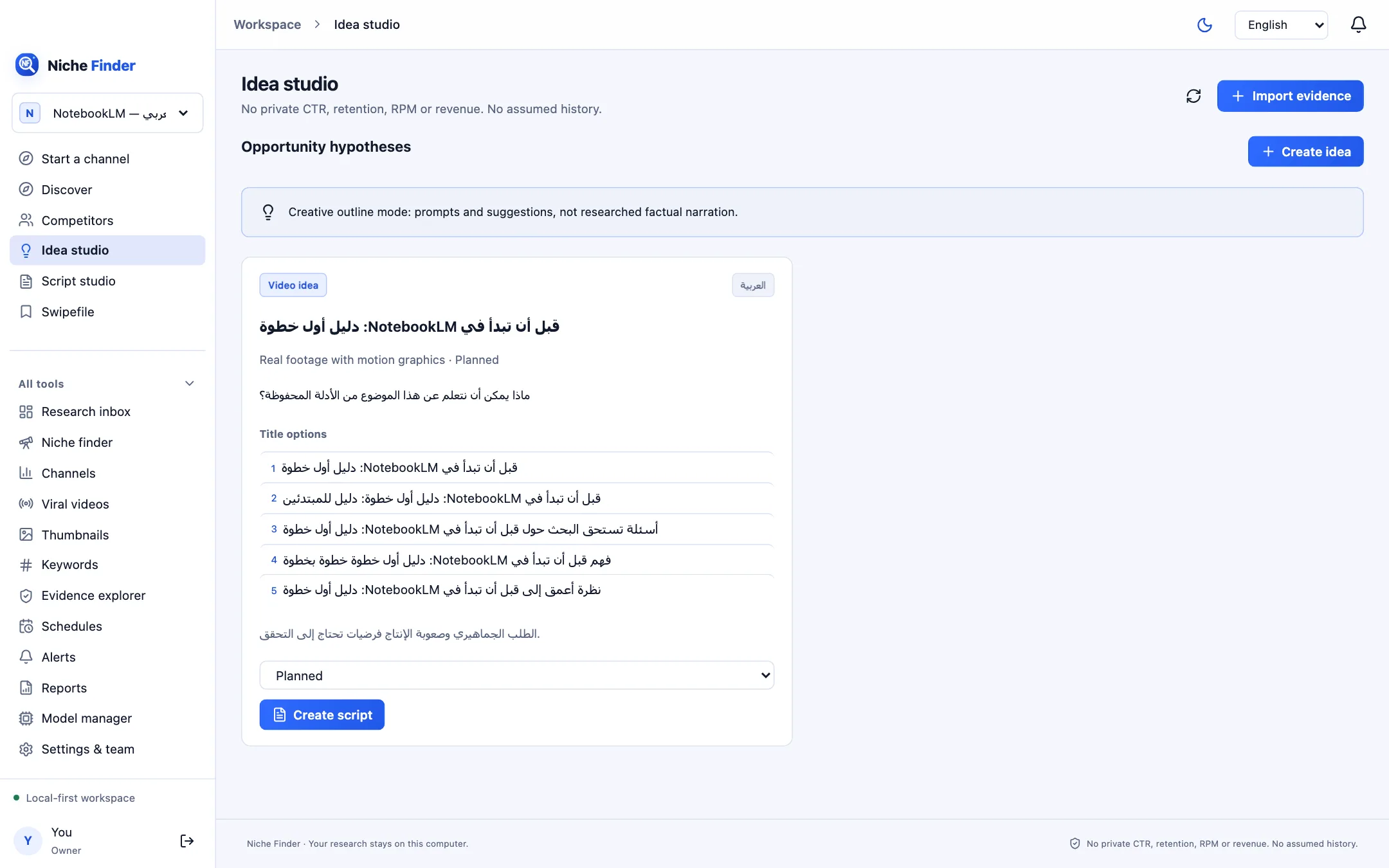
Create an idea
- Save at least one opportunity hypothesis first, from Evidence explorer (“Save opportunity”). Until then, “Create idea” stays disabled.
- Click “Create idea” and choose the hypothesis it builds on.
- Pick the Idea type (Video idea or Channel concept), the Output language and the Production mode.
- Leave “Use selected local model” unticked for a creative outline that needs no AI, or tick it to draft with the model assigned in Model manager.
- Save. The idea card appears in the grid.
Work with an idea card
- The type and language badges, production mode and current status.
- An opening hook and “Title options”: click any option to make it the idea’s title.
- A short risk note to review before production.
- The status menu: Discovered, Validated by evidence, Shortlisted, Scripting, Planned, Produced, Published, Reviewed, Rejected or Archived. Choosing Published asks for the published video URL.
- “Create script” opens a draft for this idea in Script studio.
Creative outline modeWithout a model, ideas are prompts and suggestions, not researched factual narration. Turning an idea into a draft does not make it a confirmed market opportunity, and nothing is ever published to your channel.